
DIPANKAR DESIGN
Call center support application
For a southern utility company

The brief
An utility organization has widespread customers across states and regions. Their field services are managed by partners, vendors and employed field service professionals. This application will help the organization to seamlessly monitor and track the field work effectiveness conducted for its consumers, and analyze the productivity, efficiency of field members with respect customer satisfaction.
The problem
With a significant increase in call volume/complaints and concerns raised by customers lead to decreased satisfaction and increased cost for an organization, the Power Texas leadership team recognized they needed to modernize their workflow and technology in order to support callers and meet new performance objectives.
My role
I worked in this project as a lead UX/UI designer where I was responsible to participate in the discovery/ideation session, user research, prototyping and user testing. I also closely work with engineers, maintaining design system and responsible to make sure final product is pixel perfect.
Methods & tools
Competitive analysis, Contextual enquiry, User flow, app map, Mid-High fidelity prototype design, Design system, User testing, Adobe XD
Process and Methods
I worked closely with the Project Manager in planning and executing a design process that aligned effectively with the clients needs as well as the development team’s approach (primarily waterfall). As this was a newly imagined solution, both the client and the development team benefited from the iterative design/test phase with low-fidelity prototypes.

Understanding the ecosystem
The existing CSR application was build on some old technology and the team decided to move it to SAP S/4 HANA supported by SAP Fiori as front end technology. I had to deep dive in to the system to understand Fiori design guidelines, SAPUI5 Controls, understand stencils, go through multiple videos and tutorials to understand how it works.

Building the personas
To approach this redesign, I needed to first represent the operational team structure of our targeted customer: a medium-sized call center comprised of close to 120 agents. Three different personas (represented in red) can usually be found in a mid size call center. A typical call center will have several departments: customer service, sales department, billing department, etc…
Team structure for our targeted user

Diving into the team structure, I represented in detail the several personas likely to collaborate within the call center. Out of the 3 personas identified during our research, 2 emerged: Caroline (supervisor) and Kelly (call center agent). Those were our primary users, the one more likely to be found at our targeted customer.


Contextual Inquiries, User and Stakeholder Interviews
I planned and conducted interviews with Resource Center staff and management at the start of the project. These stakeholder interviews yielded valuable information about the current pain points and struggle the team was experiencing. I conducted contextual inquiries with the customer service representatives (CSRs). This provided a “boots on the ground” perspective of call volume, application usage, and individual workarounds.
Insights

Each Call Center staff member recorded call information on individual notebooks (shown), with no data being collected on the nature of the call.
Most workflows involved a “start-and-stop” process; where initial caller information was collected and recorded and would be “picked up” later when there was time to locate requested information.
While looking at the existing application, It was evident that it was limited in terms of functionalities: there was no possibility for a supervisor like Caroline to have an overview of each agent’s statuses within the call center. This greatly reduced her ability to manage the call center.


Use Cases and Workflows
I documented the app’s use cases and workflows. This provided value to the project at multiple levels like acted as a guide for designing the UIs, gave a clear path and clarity to the engineering team, this also helped us during user testing to focus on the most critical tasks that needed to be tested.
User stories


Sketches, Wireframes and Prototypes
I typically prefer sketching interface and interaction designs as it allows for greater exploration and generation of more ideas without being concerned with smaller details such as colors, fonts, and precise alignment.
I have also found that sketching also improves communication when early designs are being shared with the team. It has everyone focus on the important issues at this early stage, such as the overall structure and flow of the interaction, while not being distracted by the details of the look.
Following review of sketches, I move to using Axure to construct wireframes with interactions and prepared for user testing.

Wireframes


Detailed design and Interactions
With input from the testing sessions I moved to create high-fidelity mockups using Adobe XD while adhering Fiori design guidelines and stencil component library. This effort included creating visual mockups while being faithful with the company branding guidelines and accessibility standards.
Challange
How might we give a tool to Kelly to monitor all the field agents work progress to help her overall call center performance and get high customer satisfaction ?
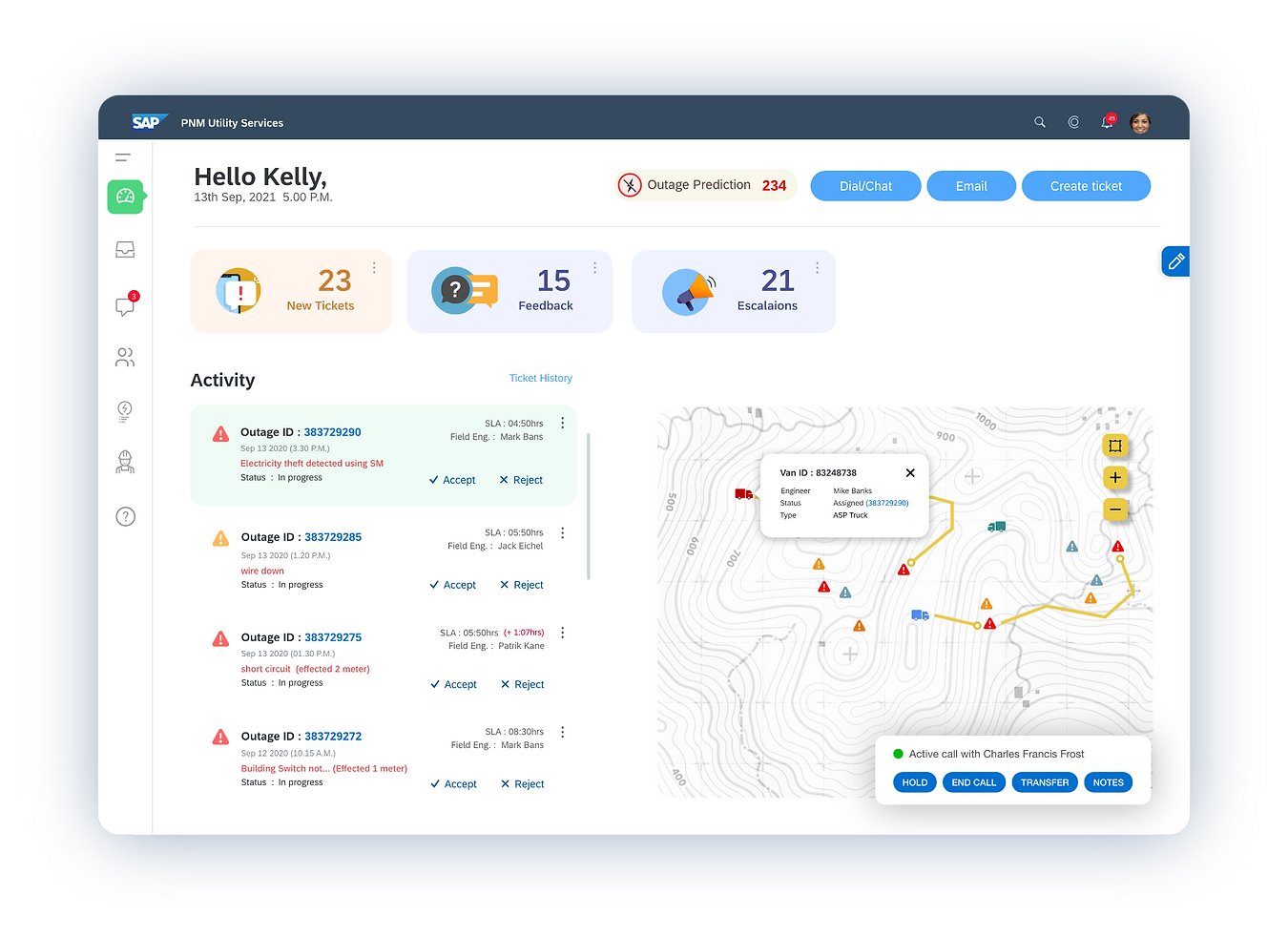
1. CSR dashboard view
Kelly would now be able to monitor all the tickets assigned to her and check the live status of what is going on the field. She will also be able to see how far is the service truck from the outage location.
2. CSR Note taking tool
How Kelly will be able to take notes quickly which call is going on ?

3. CSR creating ticket
How Kelly will be able to create a ticket quickly and system will assign a field engineer based on geolocation and availability

4. CSR checking ticket details
How Kelly will be able to check outage prediction alerts and based on that take necessary actions to get resources

5. CSR checking outage prediction
How Kelly will be able to check outage prediction alerts and based on that take necessary actions to get resources


